


- Mentorship capstone
- 4 months
- 7 designers
- AI concept
Nextrail
People save hundreds of travel reels, then plan their trip from a blank search box. Feed2Fly makes the inspiration you’ve already saved the starting point of the trip.
- Role
- Lead Designer, team of 7
- I led
- Design process, UX/UI direction
- I designed
- Feed2Fly, end to end
The problem
We save hundreds of travel ideas.
Then plan from zero.
A reel here, a saved video there, a link sent to a friend. Saving travel inspiration is effortless, and it piles up for months. But when a trip finally becomes real, none of it is there. Planning opens on an empty “Where to?” box, and everything you collected has to be found and rebuilt by hand.
- 01Discover
- 02Save
- 03Forget
- 04Plan
- 05Start from zero
“I keep saving reels and videos, but I never know how to turn them into an actual trip.”
Interview participant
What we learned
Three things kept coming up.
- 145 survey responses
- 15–20 interviews by the team
- 3 of them run by me
Inspiration lives on social media.
In interviews, people described finding places through reels, shorts and creator videos far more than through travel sites. The discovery happens long before any planning tool is opened.
Saving is easy. Coming back is not.
People talked about saving travel content constantly, meaning to return to it, but rarely going back to it when it was actually time to plan.
Planning still starts from scratch.
When a trip became real, the saves weren’t part of it. Planning meant opening a blank search and rebuilding everything by hand.


What the survey added
61.4%
said it would help if an app suggested destinations based on social content they’d liked or saved
75.2%
currently plan their trips themselves
145 responses. These are directional findings: they told us the gap was worth designing for, not that people would use the product. The interviews explained the behaviour; the survey gave a sense of how widely the interest was shared.
In their own words
Every app gives me pieces, but none of them give me everything I need in one place.
I use Google Maps, Booking.com, and ChatGPT, but I still end up feeling confused and unprepared.
The decision
Feed2Fly first.
Not the highest score.
As a team we explored several directions, and the survey showed interest in all of them. Feed2Fly didn’t top the list. I still pushed for it to become the main experience.
- 77.2%Hidden-gems discoveryexcited by a feature for discovering hidden gems
- 66.9%Personalised trip planningprefer a trip planned around their vibe, history and preferences
- 61.4%Feed2FlyMain experiencewould find suggestions from saved or liked social content helpful
- —Budgeting, AI itinerary generation and moreexplored by the team as part of the wider product
Why Feed2Fly
Hidden gems and personalised itineraries are valuable, but they’re familiar territory for travel apps. Feed2Fly addressed a specific behaviour: people already collect inspiration, then lose it the moment planning begins. It built on a habit people already have, instead of asking them to start a new one.
The trade-off
The other directions became supporting parts of the product, not the story. Product direction was shaped as a team; my part was making the case for which problem Nextrail should lead with.
So instead of asking
“Where do you want to go?”
Nextrail starts with
“What already inspired you?”

Introducing
Feed2Fly.
Your saved travel content, turned into the start of your next trip.
Share a travel video into Nextrail, or upload a screenshot. AI picks out what’s travel-relevant, files it under its destination, and lets you carry the parts you choose straight into planning. I designed the whole experience, from the first share to the itinerary.
Where the AI fits
It prepares.
You decide.
A saved reel is unstructured: a video, a caption, a creator. Without interpretation, Feed2Fly would just be another bookmark folder. The AI’s job is to turn each post into trip information you can plan around, and then step back.
A saved post
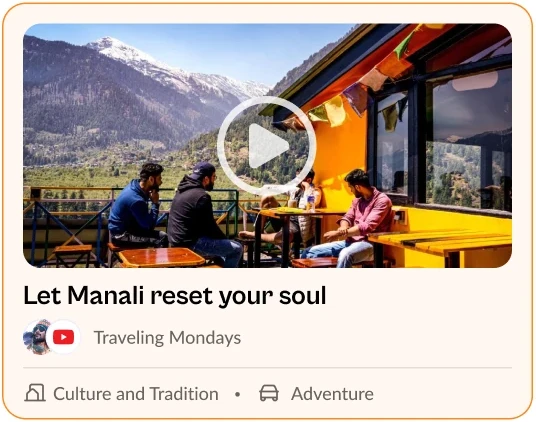
What Feed2Fly pulls out
- Destination
- Manali, Himachal Pradesh
- Stay
- La Vaca Hostel
- Food
- Hidma’s Cafe and Coffee House
- Places
- Beas River · Museum of Himachal Culture
- Vibe
- Culture and Tradition · Adventure
The AI does
- Read what you share: videos, links, screenshots
- Pick out travel-relevant details
- Group everything by destination
You do
- Filter and review what it found
- Choose what goes into a trip
- Edit the summary and the plan it becomes
How it works
From a reel to a plan.
01 / 04
See something
worth going to.
A place, a stay, a viewpoint or a café turns up while you scroll: a reel, a short, a clip from someone whose taste you trust.
02 / 04
Send it
to Nextrail.
Instead of saving it somewhere you’ll forget, share it to Nextrail from the share sheet you already use, or paste the link into Feed2Fly.
03 / 04
AI sorts it
by destination.
Feed2Fly reads each post for the destination and the places, stays, food and activities in it, then files it under that destination, tagged by vibe. You filter and pick the posts that belong in this trip.
04 / 04
Planning starts
from your saves.
Your picks carry into the trip summary as “From Feed2Fly”. The planner only asks what your saves can’t tell it (when, who, budget) and builds a day-by-day plan you can still edit.

Designing for control
Nothing becomes a trip until you choose it.
Automation is useful for sorting a pile of posts. It shouldn’t decide where you go. Every step after the AI’s read gives the decision back to the person.
 01
01Narrow it down
Filter a destination’s saves by vibe, platform or creator.
 02
02Choose what goes in
Pick the posts that belong in this trip, or select them all. Nothing enters a plan until you choose it.
 03
03Read the plan
The generated trip is laid out day by day, with stays, timings and travel between stops.
 04
04Change the plan
Every day stays editable: reorder, edit or remove any stop, then save or discard the changes.
Leading the team
Seven designers, one product.
Seven of us collaborated across the whole product, each contributing where their strengths were. I planned the design process, matched work to people, and reviewed the work as it came together, so seven workstreams read as one product instead of seven concepts.
Visual design
One visual language.
I set the visual direction and designed the final interface, turning the team’s flows and wireframes into one consistent product: the same cards, chips, step pattern and action hierarchy from the home screen to booking.
 Home
Home Trip planner
- Feed2Fly
- Itinerary
 Booking
My role
Hands-on Lead Designer.
I designed Feed2Fly end to end, from sharing travel content and how the AI’s read of it is shown, through organising and selecting, to the trip summary and its handoff into planning. I was also the primary UX/UI and visual designer for the product. Alongside that, I planned the design process, matched work to each designer’s strengths, and reviewed the team’s work to keep it moving as one product.
I led
- Planning the design process
- Matching work to each designer’s strengths
- Design reviews and consistency across workstreams
- Visual and UI direction
- Making the case for Feed2Fly as the main experience
I designed
- Feed2Fly, end to end: sharing in, the AI’s read of each post, destination grouping, filters, selection, trip summary and the itinerary in this flow
- The final visual design of the product
We did together
- Research: 145 survey responses, 15–20 interviews
- Problem exploration and product discussions
- Flows and wireframes
- Branding and presentations
- The wider product: budgeting, hidden gems, itinerary generation
Outcome
What we delivered, and what I learned.
Nextrail was a 4-month mentorship capstone: a concept, not launched or usability-tested. We delivered a complete flow from a saved reel to an editable trip, and a product designed by seven people that reads as one visual and interaction system.
- Start with behaviour, not features.
- Feed2Fly worked as a direction because it built on something people already do, saving travel content, instead of asking them to learn a new habit.
- AI should prepare, not decide.
- The AI turns a pile of posts into trip information; the person decides what becomes the trip. Next, I’d design for the post it misreads, and test whether people trust what it extracts.
- Leading means choosing the story.
- With seven designers and several good directions, the most useful thing I could do was help the team agree on what the product was about first.